
10 Best Call Center Analytics Software (2026)

- Updated:
- Authored by
-
 Richard James Director of Organic Growth and CX
 - Reviewed by
-
 Sean Minter Founder, CEO
Call center analytics software captures, analyzes, and surfaces interaction, performance, and customer data from across the contact center. CX analysts, QA teams, and executives use call center analytics software to guide staffing, coaching, quality, and service cost decisions.
In 2026, CX leaders and executives need call center analytics software that turns customer, agent, and performance intelligence into clear priorities and role specific actions across the organization.
The best call center analytics software vendors of 2026 in our review are AmplifAI, NICE CXone, Verint, Genesys Cloud, CallMiner, Cresta, Observe.AI, Five9, Talkdesk, and Diapad. Our team of CX specialists ranked each vendor by coverage across call center analytics ingestion types, data-source integrations, analysis depth, role-based insights delivery, analytics-to-action execution, and performance outcome measurement.
Before purchasing call center analytics software, you need to evaluate:
- Types of Call Center Analytics: The different analytics types vendors support across voice, text, workflow, channel, and self-service data.
- Call Center Analytics Software Limitations: Limitations across the various call center analytics software types, from how much data each type can reach to where insights hand off short of action.
- Call Center Analytics Software Features: Features separating call center analytics software vendors, including data unification, analytics types, AI capabilities, and workflow connections.
- Call Center Analytics Software Evaluation Criteria: How vendors stack up on the criteria that matter most to CX leaders and contact center leadership.
Top Pick for 2026: AmplifAI ranks #1 on our list of call center analytics software in 2026 for unifying structured and unstructured data across CCaaS, CRM, WFM, QA, surveys, transcripts, and legacy systems into one AI-ready layer powering performance analytics, KPI visibility, prescriptive next best actions, and outcome measurement. Named a Leading provider in the 2026 CMP Research Prism for Automated QA/QM and winner of Automation Solution of the Year at the 2026 CCW Excellence Awards, AmplifAI turns analytics into roles specific actions.
Compare the Best Call Center Analytics Software of 2026
Compare the 10 best call center analytics software for 2026, evaluated based on software types, feature coverage, and evaluation criteria.
| Rank | Call Center Analytics Software | Overview |
|---|---|---|
| 1 | AmplifAI | AmplifAI call center analytics software unifies structured and unstructured data across CCaaS, CRM, WFM, QA, surveys, transcripts, and legacy systems into one AI-ready layer, connecting analytics to coaching workflows, customer intelligence, next best actions, and outcome measurement, winning Automation Solution of the Year at the 2026 CCW Excellence Awards, and named a Leading provider in the 2026 CMP Research Prism for Automated QA/QM. |
| 2 | NICE CXone | NICE CXone call center analytics software provides analytics across contact center interactions, quality programs, workforce workflows, and customer experience data inside the NICE CXone ecosystem. |
| 3 | Verint | Verint call center analytics software connects interaction analysis, workforce management, quality management, and customer experience reporting across the Verint product set. |
| 4 | Genesys Cloud | Genesys Cloud call center analytics software analyzes contact center interactions, quality data, workforce data, and customer journey data inside the Genesys Cloud environment. |
| 5 | CallMiner | CallMiner call center analytics software analyzes customer interactions across voice and digital channels, organizing sentiment, topics, customer intent, and compliance findings into one conversation analytics environment. |
| 6 | Cresta | Cresta call center analytics software analyzes customer interactions to surface behavior patterns, quality findings, coaching opportunities, and conversation trends inside the Cresta product set. |
| 7 | Observe.AI | Observe.AI call center analytics software analyzes customer conversations to surface quality findings, compliance risks, customer intent, and coaching opportunities from interaction data. |
| 8 | Five9 | Five9 call center analytics software analyzes customer interactions, quality findings, and contact center activity inside the Five9 environment. |
| 9 | Talkdesk | Talkdesk call center analytics software analyzes customer interactions, quality findings, and contact center activity inside the Talkdesk environment. |
| 10 | Dialpad | Dialpad call center analytics software analyzes customer conversations, quality findings, and contact center activity inside the Dialpad environment. |
| The 10 best call center analytics software vendors are evaluated across analytics types, technical capabilities, evaluation criteria, and real-world adoption, with emphasis on unified data access, analytics-to-action workflows, customer intelligence, and outcome measurement. | ||
2026 CMP Research Prism for Automated QA/QM
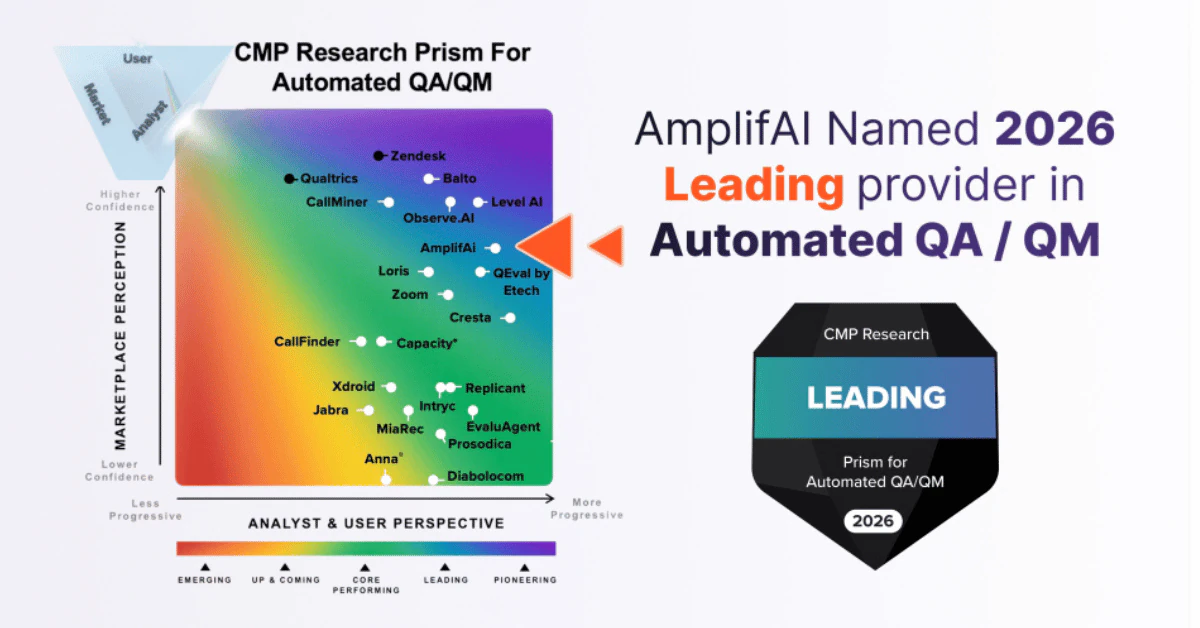
AmplifAI was named a Leading provider in the 2026 CMP Research Prism for Automated QA/QM, earning the highest possible progressive score for integration, AI accuracy, and data security.
CMP Research evaluated 22 automated QA/QM solution providers in the 2026 Prism for Automated QA/QM, assessing each across ten key investment criteria.
Several vendors featured in this call center analytics software comparison guide also appear in the CMP Research Prism, making the full report a valuable companion when evaluating vendors.
What is Call Center Analytics Software
Call center analytics software captures, analyzes, and organizes interaction data, performance data, and customer data across the contact center, turning call transcripts, chat records, QA results, workforce data, survey responses, and customer activity into dashboards, reports, trends, and insights.
Call center analytics software feeds performance dashboards, KPI reporting, and quality monitoring. Reporting-focused analytics software surfaces what happened, while unified call center analytics software connects insights to quality management, coaching, customer intelligence, and follow-up actions across the contact center.
Types of Call Center Analytics
Call center analytics types capture different layers of contact center data across voice interactions, written interactions, customer journeys, workflow activity, and self-service behavior.
| Call Center Analytics Type | What It Captures |
|---|---|
| Speech Analytics | Captures voice interactions including transcripts, tone, pacing, silence, and emotion patterns across calls. |
| Text Analytics | Captures written communication across chat, email, surveys, and support tickets, identifying language patterns, sentiment, and topics. |
| Predictive Analytics | Analyzes historical data patterns to identify trends in call volume, behavior, and resolution outcomes. |
| Interaction Analytics | Analyzes conversation flow across interactions, identifying topic shifts, confusion points, and resolution triggers. |
| Desktop & Mobile Analytics | Analyzes agent system usage, application switching, and workflow patterns during customer interactions. |
| Cross-Channel Analytics | Analyzes customer journeys across channels, identifying movement between chat, phone, email, and messaging channels and where breakdowns occur. |
| Self-Service Analytics | Captures interactions with IVR, knowledge bases, and chatbots, identifying gaps between customer intent and resolution. |
| Strategic Guidance: Call center analytics types map the main layers of customer interaction data across voice, text, behavior, workflows, channels, and self-service activity. | |
Call Center Analytics Software Limitations
Call center analytics software limitations stem from incomplete data, disconnected workflows, and analytics that stop at reporting. Generative AI can ingest data, categorize interactions, surface insights, and recommend actions, but AI can only work from the structured and unstructured data it can access. When CCaaS records, CRM data, workforce data, QA results, survey responses, and customer activity are split across separate systems, AI recommendations aren't reliable, leaving CX leaders, quality teams, and executives to reconcile data before taking action.
Many call center analytics software vendors stop at dashboards, trends, and KPI movement without delivering role-based actions to the teams responsible for customer service and performance outcomes.
What Call Center Analytics Software Needs to Succeed
Call center analytics software needs complete data access, connected systems, and workflows that move insight into action. Generative AI, predictive models, dashboards, and analytics workflows can only reflect the contact center data they can access and the actions they can support.
Access to Structured and Unstructured Data
Call center analytics software needs access to structured and unstructured data across transcripts, interaction records, CRM data, QA results, workforce data, survey responses, and customer activity. Incomplete data access produces incomplete analytics, weaker AI recommendations, and limited visibility into what is happening across the contact center.
Cross-System Data Integration
Call center analytics software needs cross-system data integration across CCaaS, CRM, WFM, QA, surveys, and legacy systems so analytics reflect the full contact center picture. Data split across disconnected systems forces contact center teams to reconcile findings manually before they can trust the analytics.
Closed-Loop Insight-to-Action Workflows
Call center analytics software needs closed-loop insight-to-action workflows so analytics connect to coaching, quality management, customer intelligence, and follow-up actions. Dashboards and reports alone don't improve performance unless analytics reach the teams responsible for acting on the insight.
Role-Based Delivery
Call center analytics software needs role-based delivery so QA teams, team leaders, CX leaders, and executives receive insights and actions tied to their role in the contact center. Analytics delivered without role context create more review work and slower follow-up across teams.
Outcome Measurement
Call center analytics software needs outcome measurement showing whether actions change performance, quality, compliance, and customer outcomes after teams act on the data. Analytics can't prove business value without measuring what changed after follow-up occurred.
Call Center Analytics Software Features
Call center analytics software features in the table below fare one of three factors used to rank vendors in this guide alongside software types, and evaluation criteria.
| Call Center Analytics Software Feature | Description & Importance | Vendors |
|---|---|---|
| Unified Data Integration | Connects structured and unstructured data from CCaaS, CRM, WFM, QA, surveys, transcripts, and legacy systems. | AmplifAI |
| Performance Dashboards and KPI Views | Shows metrics, KPIs, scorecards, and performance trends across agents, teams, and business units. | AmplifAI, NICE CXone, Genesys Cloud, Verint, Cresta |
| Conversation Intelligence | Analyzes voice, chat, email, and messaging interactions for intent, topics, compliance risks, and behavior patterns. | AmplifAI, NICE CXone, Genesys Cloud, CallMiner, Observe.AI |
| Sentiment and Emotion Detection | Identifies customer and agent tone, sentiment shifts, and emotion patterns across interactions. | AmplifAI, NICE CXone, Genesys Cloud, CallMiner, Observe.AI |
| Topic and Trend Identification | Identifies recurring contact reasons, behavior patterns, issue clusters, and trend changes across interactions. | AmplifAI, NICE CXone, CallMiner, Cresta, Observe.AI |
| Predictive Analytics | Uses historical data to forecast call volume, customer behavior, agent behavior, and outcome trends. | AmplifAI, NICE CXone, Genesys Cloud, Verint, CallMiner |
| Cross-Channel Analytics | Analyzes customer interactions across voice, chat, email, messaging, and self-service channels. | AmplifAI, NICE CXone, Genesys Cloud, Verint, CallMiner |
| Customer Intent and Call Reason Analysis | Identifies customer intent, call drivers, root causes, and repeat contact patterns across interactions. | AmplifAI, NICE CXone, Genesys Cloud, CallMiner, Observe.AI |
| Quality Assurance and Compliance Monitoring | Tracks evaluation results, compliance risks, score patterns, and quality issues across interactions. | AmplifAI, NICE CXone, Genesys Cloud, Verint, CallMiner |
| Quality Forms and Scorecard Management | Supports evaluation forms, scorecards, scoring logic, and QA review structures across teams and channels. | AmplifAI, NICE CXone, Verint, Cresta |
| Coaching Workflows | Connects analytics findings to coaching sessions, follow-up tasks, coaching records, and skill-development workflows. | AmplifAI, NICE CXone, Verint, CallMiner |
| Next Best Actions | Recommends follow-up actions for team leaders, QA teams, and other contact center roles based on analytics findings. | AmplifAI |
| Customer Journey Insights | Connects interaction history, transfer patterns, repeat contacts, and escalation paths across the customer journey. | AmplifAI, NICE CXone, Genesys Cloud, Verint, CallMiner |
| Survey and Voice of Customer Analysis | Analyzes survey scores, survey comments, and voice of customer data alongside interaction data. | AmplifAI, NICE CXone, Verint, CallMiner |
| Customer Intelligence | Connects customer feedback, contact reasons, sentiment, and outcome patterns to identify satisfaction drivers and friction patterns. | AmplifAI, NICE CXone, Genesys Cloud, Verint, CallMiner |
| Outcome Measurement and Performance Correlation | Measures changes in performance, quality, compliance, and customer outcomes after actions are taken. | AmplifAI |
| Technical Prerequisite: Call center analytics software features vary based on data access, analytics coverage, workflow depth, and action capabilities. | ||
Call Center Analytics Software Evaluation Criteria
Use the call center analytics software evaluation criteria below to help assess vendor fit against your contact center requirements before building your shortlist.
| Evaluation Criteria | What to Evaluate | Why It Matters |
|---|---|---|
| Data Integration Depth | Review which structured and unstructured data sources the vendor connects, including CCaaS, CRM, WFM, QA, surveys, transcripts, and legacy systems. | Analytics quality depends on complete structured and unstructured data inputs. |
| Cross-System Visibility | Confirm whether the vendor correlates performance data, customer data, QA data, and workforce data across systems. | Disconnected systems produce partial analytics and force teams to reconcile findings manually. |
| Dashboard and KPI Usability | Review how the vendor presents dashboards, scorecards, metrics, and KPI trends for daily use. | Usable dashboards help teams identify issues faster, spot trends earlier, and prioritize follow-up. |
| Analytics Depth | Review whether the vendor supports conversation analytics, sentiment analysis, trend identification, predictive analytics, and quality analytics. | Shallow analytics limit what teams can identify, investigate, and measure. |
| Cross-Channel Coverage | Confirm which channels the vendor analyzes, including voice, chat, email, messaging, and self-service. | Channel gaps create incomplete customer and performance analysis. |
| Analytics-to-Action Execution | Review whether analytics findings connect to QA actions, coaching workflows, performance management, or leadership follow-up. | Analytics only improve performance when teams can act on findings. |
| Measurement of Outcomes | Confirm whether the vendor measures changes in quality, compliance, performance, and customer outcomes after actions are taken. | Outcome measurement shows whether analytics-driven actions work. |
| Vendor Independence | Review whether the vendor works across your existing software stack or depends on one vendor ecosystem. | Ecosystem limits restrict data access, analytics coverage, and software flexibility. |
| Implementation Practicality | Review implementation requirements, data mapping, system access, and time to usable analytics. | Implementation complexity delays adoption and reduces data coverage. |
| Customer Success and Optimization Support | Review whether the vendor supports configuration, data alignment, workflow setup, and ongoing optimization. | Ongoing support affects long-term analytics quality, workflow adoption, and business value. |
| Decision Logic: Selecting call center analytics software requires matching vendor data coverage, analytics depth, and workflow execution to your contact center requirements. | ||
Best Call Center Analytics Software (2026)
The best call center analytics software of 2026 are ranked by software type coverage, feature depth, and evaluation criteria, with each vendor review including a capability breakdown, best-fit use cases, and considerations.
1. AmplifAI Call Center Analytics Software
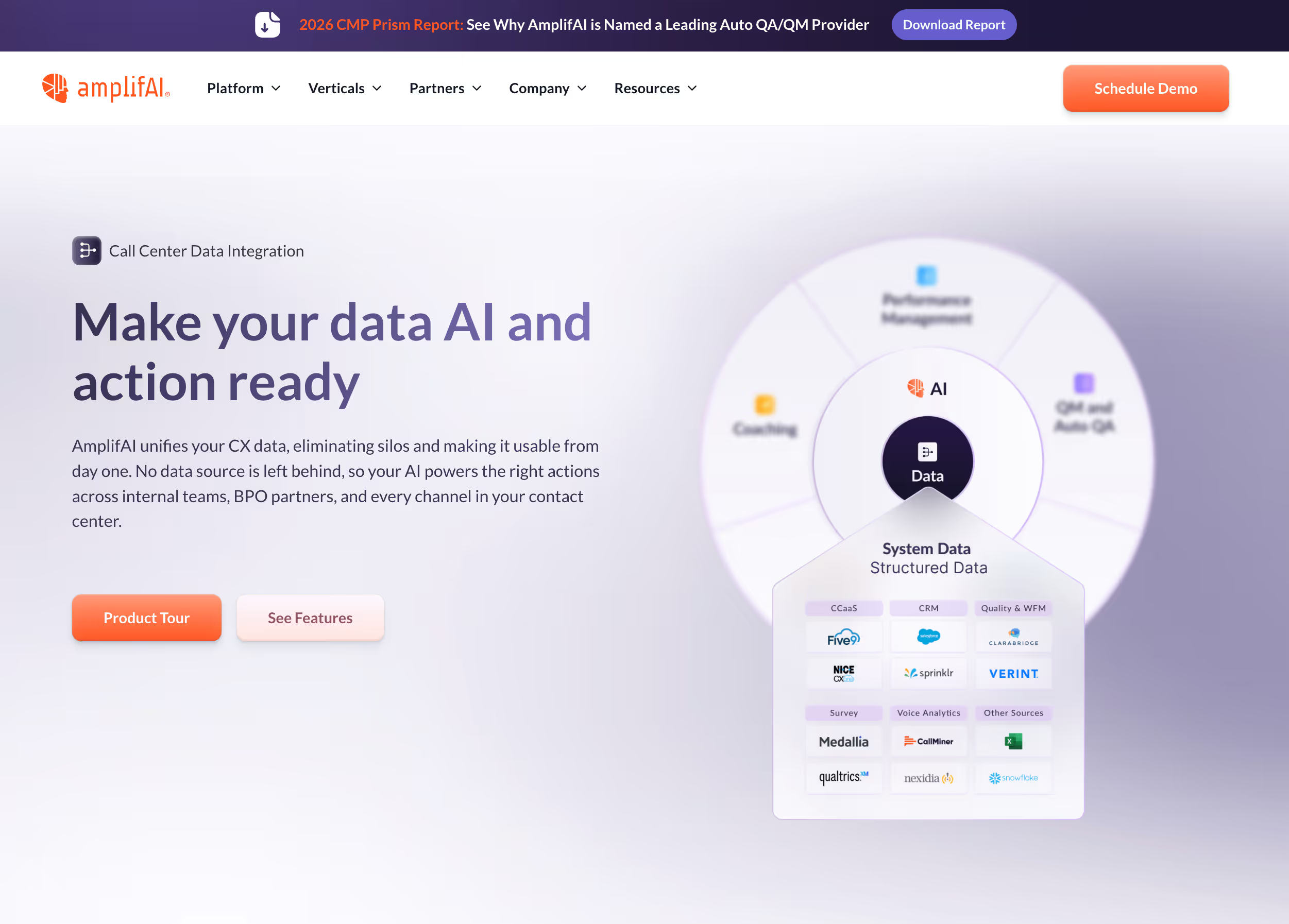
AmplifAI call center analytics software unifies structured and unstructured data across CCaaS, CRM, WFM, QA, surveys, transcripts, and legacy systems, creating an AI-ready data layer powering performance analytics dashboards, conversation intelligence, quality monitoring, coaching workflows, customer intelligence, and next best actions from the same unified data foundation. AmplifAI won Automation Solution of the Year at the 2026 CCW Excellence Awrds, and was named a Leading provider in the 2026 CMP Research Prism for Automated QA/QM.
AmplifAI Call Center Analytics Software Features and Capabilities
| Call Center Analytics Software Capability | Capability Description | AmplifAI |
|---|---|---|
| Unified Data Integration | Connects structured and unstructured data from CCaaS, CRM, WFM, QA, surveys, transcripts, and legacy systems. | ✅ |
| Performance Dashboards and KPI Views | Shows metrics, KPIs, scorecards, and performance trends across agents, teams, and business units. | ✅ |
| Conversation Intelligence | Analyzes voice, chat, email, and messaging interactions for intent, topics, compliance risks, and behavior patterns. | ✅ |
| Sentiment and Emotion Detection | Identifies customer and agent tone, sentiment shifts, and emotion patterns across interactions. | ✅ |
| Topic and Trend Identification | Identifies recurring contact reasons, behavior patterns, issue clusters, and trend changes across interactions. | ✅ |
| Predictive Analytics | Uses historical data to forecast call volume, customer behavior, agent behavior, and outcome trends. | ✅ |
| Cross-Channel Analytics | Analyzes customer interactions across voice, chat, email, messaging, and self-service channels. | ✅ |
| Customer Intent and Call Reason Analysis | Identifies customer intent, call drivers, root causes, and repeat contact patterns across interactions. | ✅ |
| Quality Assurance and Compliance Monitoring | Tracks evaluation results, compliance risks, score patterns, and quality issues across interactions. | ✅ |
| Quality Forms and Scorecard Management | Supports evaluation forms, scorecards, scoring logic, and QA review structures across teams and channels. | ✅ |
| Coaching Workflows | Connects analytics findings to coaching sessions, follow-up tasks, coaching records, and skill-development workflows. | ✅ |
| Next Best Actions | Recommends follow-up actions for team leaders, QA teams, and other contact center roles based on analytics findings. | ✅ |
| Customer Journey Insights | Connects interaction history, transfer patterns, repeat contacts, and escalation paths across the customer journey. | ✅ |
| Survey and Voice of Customer Analysis | Analyzes survey scores, survey comments, and voice of customer data alongside interaction data. | ✅ |
| Customer Intelligence | Connects customer feedback, contact reasons, sentiment, and outcome patterns to identify satisfaction drivers and friction patterns. | ✅ |
| Outcome Measurement and Performance Correlation | Measures changes in performance, quality, compliance, and customer outcomes after actions are taken. | ✅ |
Standout Features and Capabilities of AmplifAI
- Unified Data Integration: Unifies structured and unstructured data across contact center systems into one AI-ready layer.
- Next Best Actions: Recommends follow-up actions for team leaders, QA teams, and other contact center roles based on analytics findings.
- Coaching Workflows: Turns analytics findings into coaching sessions, follow-up tasks, coaching records, and skill-development workflows.
- Customer Intelligence: Uses customer feedback, contact reasons, sentiment, and outcome patterns to identify satisfaction drivers and friction points.
- Outcome Measurement and Performance Correlation: Measures changes in performance, quality, compliance, and customer outcomes after actions are taken.
Best Fit: Who Should Use AmplifAI
- Enterprise contact centers and BPOs with data spread across multiple systems
- Contact centers that need analytics tied to QA, coaching, performance management, and customer intelligence
- Teams that need role-specific actions, not dashboard visibility alone
- Contact centers that need to measure whether follow-up actions improve outcomes
AmplifAI Considerations
- AmplifAI connects to existing contact center infrastructure rather than replacing CCaaS software.
- AmplifAI requires access to the data sources that drive analytics, coaching, performance management, and customer intelligence.
- AmplifAI is strongest in environments where contact center leaders want analytics tied to actions across multiple roles.
AmplifAI Call Center Analytics Software Overview
AmplifAI call center analytics software fits contact centers that need analytics connected across systems, roles, and workflows. AmplifAI differs from vendors that stop at dashboards, conversation analysis, or isolated quality monitoring because AmplifAI uses one AI-ready data layer to deliver analytics, actions, and outcome measurement across the contact center.
Speak to the #1 Call Center Analytics Software Vendor
2. NICE CXone Call Center Analytics Software
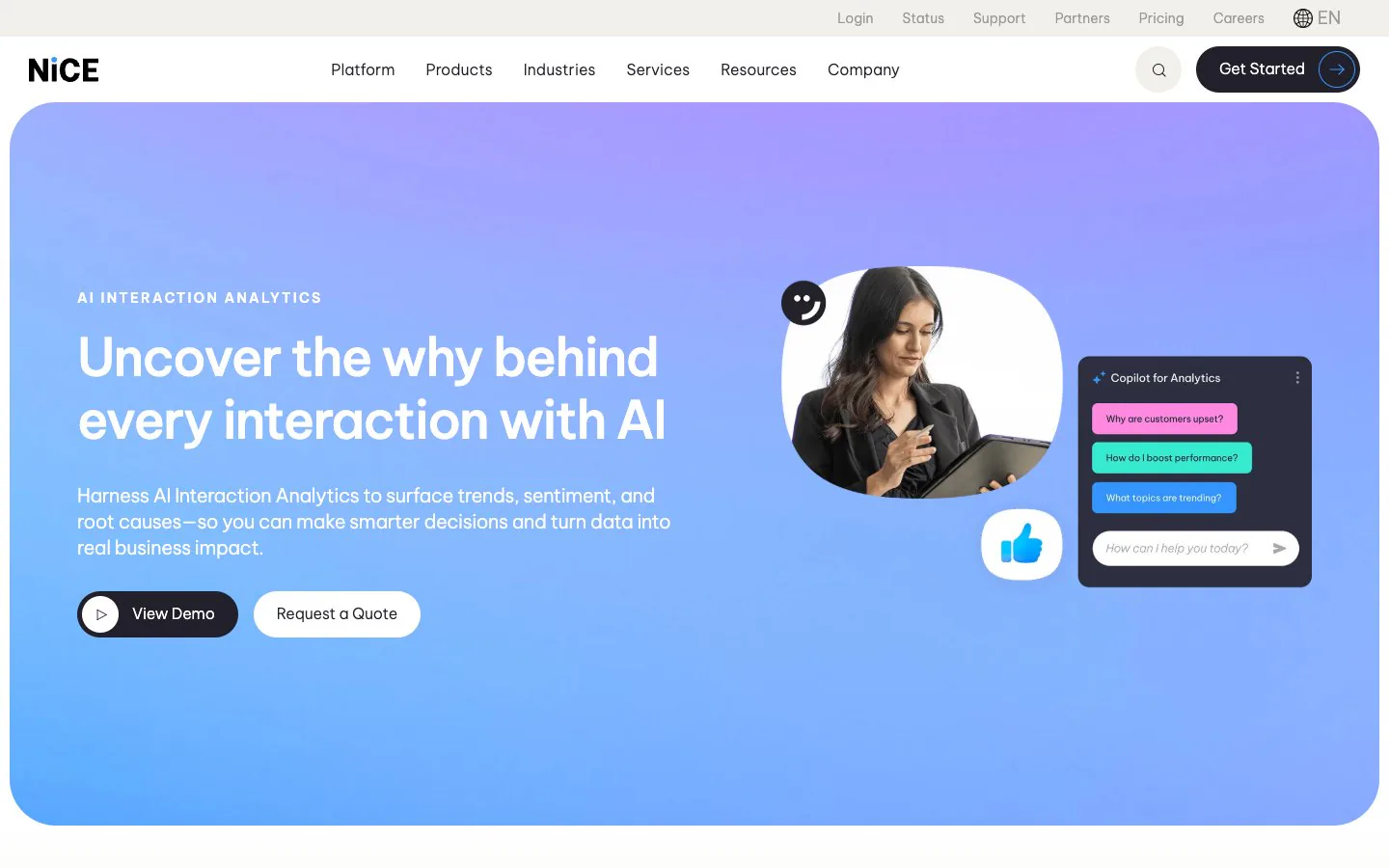
NICE CXone call center analytics software analyzes interaction data, quality data, workforce data, and customer experience data inside the NICE CXone ecosystem. NICE CXone supports analytics, quality management, and customer experience visibility within the same CCaaS environment.
NICE CXone Call Center Analytics Software Features and Capabilities
| Call Center Analytics Software Capability | Capability Description | NICE CXone |
|---|---|---|
| Unified Data Integration | Connects structured and unstructured data from CCaaS, CRM, WFM, QA, surveys, transcripts, and legacy systems. | ❌ |
| Performance Dashboards and KPI Views | Shows metrics, KPIs, scorecards, and performance trends across agents, teams, and business units. | ✅ |
| Conversation Intelligence | Analyzes voice, chat, email, and messaging interactions for intent, topics, compliance risks, and behavior patterns. | ✅ |
| Sentiment and Emotion Detection | Identifies customer and agent tone, sentiment shifts, and emotion patterns across interactions. | ✅ |
| Topic and Trend Identification | Identifies recurring contact reasons, behavior patterns, issue clusters, and trend changes across interactions. | ⚠️ |
| Predictive Analytics | Uses historical data to forecast call volume, customer behavior, agent behavior, and outcome trends. | ⚠️ |
| Cross-Channel Analytics | Analyzes customer interactions across voice, chat, email, messaging, and self-service channels. | ✅ |
| Customer Intent and Call Reason Analysis | Identifies customer intent, call drivers, root causes, and repeat contact patterns across interactions. | ✅ |
| Quality Assurance and Compliance Monitoring | Tracks evaluation results, compliance risks, score patterns, and quality issues across interactions. | ✅ |
| Quality Forms and Scorecard Management | Supports evaluation forms, scorecards, scoring logic, and QA review structures across teams and channels. | ✅ |
| Coaching Workflows | Connects analytics findings to coaching sessions, follow-up tasks, coaching records, and skill-development workflows. | ✅ |
| Next Best Actions | Recommends follow-up actions for team leaders, QA teams, and other contact center roles based on analytics findings. | ⚠️ |
| Customer Journey Insights | Connects interaction history, transfer patterns, repeat contacts, and escalation paths across the customer journey. | ✅ |
| Survey and Voice of Customer Analysis | Analyzes survey scores, survey comments, and voice of customer data alongside interaction data. | ✅ |
| Customer Intelligence | Connects customer feedback, contact reasons, sentiment, and outcome patterns to identify satisfaction drivers and friction patterns. | ✅ |
| Outcome Measurement and Performance Correlation | Measures changes in performance, quality, compliance, and customer outcomes after actions are taken. | ❌ |
Standout Features and Capabilities of NICE CXone
- Conversation Intelligence: Analyzes contact center interactions inside the NICE ecosystem.
- Quality Assurance and Compliance Monitoring: Tracks evaluation results and compliance risks across interactions.
- Customer Journey Insights: Connects interaction history and transfer patterns across the customer journey.
Best Fit: Who Should Use NICE CXone
- Contact centers already standardized on NICE CXone infrastructure
- Enterprise teams that need analytics across quality, workforce, and customer experience
- Organizations that prefer analytics inside the same CCaaS ecosystem
NICE CXone Considerations
- NICE CXone analytics remain tied to the NICE CXone ecosystem
- NICE CXone doesn't provide an agnostic unified data layer across external systems
- NICE CXone doesn't provide closed-loop outcome measurement across actions and results
NICE CXone Call Center Analytics Software Overview
NICE CXone call center analytics software is built for contact centers using NICE CXone as the core system for interaction management, quality programs, and customer experience analysis. NICE CXone keeps analytics, quality monitoring, and journey visibility inside the same contact center stack, giving teams one environment for reviewing interaction data and managing follow-up workflows.
Compare NICE CXone to AmplifAI for Call Center Analytics
Compare NICE CXone Alternatives
3. Verint Call Center Analytics Software
Verint call center analytics software connects interaction analysis, workforce management, quality management, and customer experience reporting across the Verint product set. Verint supports contact centers that manage forecasting, staffing, quality programs, coaching activity, and customer experience reporting inside the same operating environment.
Verint Call Center Analytics Software Features and Capabilities
| Call Center Analytics Software Capability | Capability Description | Verint |
|---|---|---|
| Unified Data Integration | Connects structured and unstructured data from CCaaS, CRM, WFM, QA, surveys, transcripts, and legacy systems. | ❌ |
| Performance Dashboards and KPI Views | Shows metrics, KPIs, scorecards, and performance trends across agents, teams, and business units. | ✅ |
| Conversation Intelligence | Analyzes voice, chat, email, and messaging interactions for intent, topics, compliance risks, and behavior patterns. | ⚠️ |
| Sentiment and Emotion Detection | Identifies customer and agent tone, sentiment shifts, and emotion patterns across interactions. | ⚠️ |
| Topic and Trend Identification | Identifies recurring contact reasons, behavior patterns, issue clusters, and trend changes across interactions. | ⚠️ |
| Predictive Analytics | Uses historical data to forecast call volume, customer behavior, agent behavior, and outcome trends. | ✅ |
| Cross-Channel Analytics | Analyzes customer interactions across voice, chat, email, messaging, and self-service channels. | ✅ |
| Customer Intent and Call Reason Analysis | Identifies customer intent, call drivers, root causes, and repeat contact patterns across interactions. | ⚠️ |
| Quality Assurance and Compliance Monitoring | Tracks evaluation results, compliance risks, score patterns, and quality issues across interactions. | ✅ |
| Quality Forms and Scorecard Management | Supports evaluation forms, scorecards, scoring logic, and QA review structures across teams and channels. | ✅ |
| Coaching Workflows | Connects analytics findings to coaching sessions, follow-up tasks, coaching records, and skill-development workflows. | ✅ |
| Next Best Actions | Recommends follow-up actions for team leaders, QA teams, and other contact center roles based on analytics findings. | ❌ |
| Customer Journey Insights | Connects interaction history, transfer patterns, repeat contacts, and escalation paths across the customer journey. | ✅ |
| Survey and Voice of Customer Analysis | Analyzes survey scores, survey comments, and voice of customer data alongside interaction data. | ✅ |
| Customer Intelligence | Connects customer feedback, contact reasons, sentiment, and outcome patterns to identify satisfaction drivers and friction patterns. | ✅ |
| Outcome Measurement and Performance Correlation | Measures changes in performance, quality, compliance, and customer outcomes after actions are taken. | ❌ |
Standout Features and Capabilities of Verint
- Workforce Management: Connects staffing, scheduling, and performance visibility inside the Verint product set.
- Quality Bot: Scores customer interactions across channels for automated quality management and compliance coverage.
- Data Insights Bot: Surfaces trends, anomalies, correlations, and KPI insights across behavioral data.
Best Fit: Who Should Use Verint
- Enterprise contact centers running workforce management, quality management, and coaching programs in the same environment
- Teams that need forecasting, staffing visibility, scorecards, and customer experience reporting together
- Organizations already operating inside the Verint product set
Verint Considerations
- Verint analytics remain centered on the Verint product environment
- External system coverage depends on the broader implementation footprint
- Unified cross-system data management isn't the core model
Verint Call Center Analytics Software Overview
Verint call center analytics software is designed for contact centers that manage workforce planning, quality operations, coaching activity, and customer experience reporting through structured programs. Verint is strongest where workforce management and quality management are central to how the contact center measures performance.
Compare Verint to AmplifAI for Call Center Analytics
4. Genesys Cloud Call Center Analytics Software
Genesys Cloud call center analytics software analyzes contact center interactions, quality data, workforce data, and customer journey data inside the Genesys Cloud environment. Genesys Cloud brings reporting, interaction analysis, quality workflows, and journey visibility into the same CCaaS product set.
Genesys Cloud Call Center Analytics Software Features and Capabilities
| Call Center Analytics Software Capability | Capability Description | Genesys Cloud |
|---|---|---|
| Unified Data Integration | Connects structured and unstructured data from CCaaS, CRM, WFM, QA, surveys, transcripts, and legacy systems. | ❌ |
| Performance Dashboards and KPI Views | Shows metrics, KPIs, scorecards, and performance trends across agents, teams, and business units. | ✅ |
| Conversation Intelligence | Analyzes voice, chat, email, and messaging interactions for intent, topics, compliance risks, and behavior patterns. | ✅ |
| Sentiment and Emotion Detection | Identifies customer and agent tone, sentiment shifts, and emotion patterns across interactions. | ✅ |
| Topic and Trend Identification | Identifies recurring contact reasons, behavior patterns, issue clusters, and trend changes across interactions. | ⚠️ |
| Predictive Analytics | Uses historical data to forecast call volume, customer behavior, agent behavior, and outcome trends. | ⚠️ |
| Cross-Channel Analytics | Analyzes customer interactions across voice, chat, email, messaging, and self-service channels. | ✅ |
| Customer Intent and Call Reason Analysis | Identifies customer intent, call drivers, root causes, and repeat contact patterns across interactions. | ✅ |
| Quality Assurance and Compliance Monitoring | Tracks evaluation results, compliance risks, score patterns, and quality issues across interactions. | ✅ |
| Quality Forms and Scorecard Management | Supports evaluation forms, scorecards, scoring logic, and QA review structures across teams and channels. | ⚠️ |
| Coaching Workflows | Connects analytics findings to coaching sessions, follow-up tasks, coaching records, and skill-development workflows. | ⚠️ |
| Next Best Actions | Recommends follow-up actions for team leaders, QA teams, and other contact center roles based on analytics findings. | ❌ |
| Customer Journey Insights | Connects interaction history, transfer patterns, repeat contacts, and escalation paths across the customer journey. | ✅ |
| Survey and Voice of Customer Analysis | Analyzes survey scores, survey comments, and voice of customer data alongside interaction data. | ❌ |
| Customer Intelligence | Connects customer feedback, contact reasons, sentiment, and outcome patterns to identify satisfaction drivers and friction patterns. | ⚠️ |
| Outcome Measurement and Performance Correlation | Measures changes in performance, quality, compliance, and customer outcomes after actions are taken. | ❌ |
Standout Features and Capabilities of Genesys Cloud
- Journey Management: Tracks customer movement across channels and interaction paths inside the Genesys Cloud environment.
- Native CCaaS Analytics: Keeps reporting, interaction analysis, and quality visibility inside the same contact center system.
- Experience Orchestration: Connects routing logic, journey data, and interaction context across the Genesys Cloud product set.
Best Fit: Who Should Use Genesys Cloud
- Contact centers already standardized on Genesys Cloud infrastructure
- Teams that need analytics, quality workflows, and journey visibility inside the same CCaaS environment
- Organizations that prefer Genesys-native reporting and interaction analysis over an external analytics layer
Genesys Cloud Considerations
- Genesys Cloud analytics remain centered on Genesys Cloud data and workflows
- Broader analysis across external systems depends on connected data sources and environment configuration
- Closed-loop outcome measurement isn't the core model
Genesys Cloud Call Center Analytics Software Overview
Genesys Cloud call center analytics software is designed for contact centers that want reporting, interaction analysis, and journey visibility inside the same CCaaS environment. Genesys Cloud is strongest where routing, analytics, and customer experience workflows already run inside the Genesys Cloud product set.
Compare Genesys Cloud to AmplifAI for Call Center Analytics
5. CallMiner Call Center Analytics Software
CallMiner call center analytics software analyzes customer interactions across voice and digital channels, organizing sentiment, topics, customer intent, and compliance findings into one conversation analytics environment. CallMiner supports contact centers that use interaction data to review quality, monitor compliance, identify contact drivers, and analyze customer experience patterns.
CallMiner Call Center Analytics Software Features and Capabilities
| Call Center Analytics Software Capability | Capability Description | CallMiner |
|---|---|---|
| Unified Data Integration | Connects structured and unstructured data from CCaaS, CRM, WFM, QA, surveys, transcripts, and legacy systems. | ❌ |
| Performance Dashboards and KPI Views | Shows metrics, KPIs, scorecards, and performance trends across agents, teams, and business units. | ⚠️ |
| Conversation Intelligence | Analyzes voice, chat, email, and messaging interactions for intent, topics, compliance risks, and behavior patterns. | ✅ |
| Sentiment and Emotion Detection | Identifies customer and agent tone, sentiment shifts, and emotion patterns across interactions. | ✅ |
| Topic and Trend Identification | Identifies recurring contact reasons, behavior patterns, issue clusters, and trend changes across interactions. | ✅ |
| Predictive Analytics | Uses historical data to forecast call volume, customer behavior, agent behavior, and outcome trends. | ✅ |
| Cross-Channel Analytics | Analyzes customer interactions across voice, chat, email, messaging, and self-service channels. | ✅ |
| Customer Intent and Call Reason Analysis | Identifies customer intent, call drivers, root causes, and repeat contact patterns across interactions. | ✅ |
| Quality Assurance and Compliance Monitoring | Tracks evaluation results, compliance risks, score patterns, and quality issues across interactions. | ✅ |
| Quality Forms and Scorecard Management | Supports evaluation forms, scorecards, scoring logic, and QA review structures across teams and channels. | ⚠️ |
| Coaching Workflows | Connects analytics findings to coaching sessions, follow-up tasks, coaching records, and skill-development workflows. | ✅ |
| Next Best Actions | Recommends follow-up actions for team leaders, QA teams, and other contact center roles based on analytics findings. | ❌ |
| Customer Journey Insights | Connects interaction history, transfer patterns, repeat contacts, and escalation paths across the customer journey. | ✅ |
| Survey and Voice of Customer Analysis | Analyzes survey scores, survey comments, and voice of customer data alongside interaction data. | ✅ |
| Customer Intelligence | Connects customer feedback, contact reasons, sentiment, and outcome patterns to identify satisfaction drivers and friction patterns. | ✅ |
| Outcome Measurement and Performance Correlation | Measures changes in performance, quality, compliance, and customer outcomes after actions are taken. | ❌ |
Standout Features and Capabilities of CallMiner
- Conversation Analytics: Structures interaction data around sentiment, topics, customer intent, and compliance findings.
- Customer Journey Analytics: Connects interaction patterns and repeat contact behavior across customer journeys.
- CallMiner Coach: Extends conversation analytics into structured coaching workflows.
Best Fit: Who Should Use CallMiner
- Contact centers with mature conversation analytics and compliance monitoring programs
- Teams that need sentiment analysis, contact driver analysis, and customer journey visibility from interaction data
- Organizations using conversation data to support QA reviews, coaching activity, and customer experience analysis
CallMiner Considerations
- CallMiner is strongest in contact centers with mature conversation analytics and compliance programs already in place
- Contact centers using multiple disconnected systems still need a separate plan for cross-system data management
- Teams without established QA, coaching, or analytics workflows may need more internal process design to turn insights into repeatable follow-up
CallMiner Call Center Analytics Software Overview
CallMiner call center analytics software is designed for contact centers that manage conversation analytics, compliance monitoring, customer journey analysis, and coaching activity from interaction data. CallMiner is strongest where conversation data is the primary source for understanding customer behavior, agent performance, and service risk.
Compare CallMiner to AmplifAI for Call Center Analytics
6. Cresta Call Center Analytics Software
Cresta call center analytics software analyzes customer interactions to surface behavior patterns, quality findings, coaching opportunities, and conversation trends inside the Cresta product set. Cresta supports contact centers that use conversation data to manage quality, guide agents, and identify the actions linked to business outcomes.
Cresta Call Center Analytics Software Features and Capabilities
| Call Center Analytics Software Capability | Capability Description | Cresta |
|---|---|---|
| Unified Data Integration | Connects structured and unstructured data from CCaaS, CRM, WFM, QA, surveys, transcripts, and legacy systems. | ❌ |
| Performance Dashboards and KPI Views | Shows metrics, KPIs, scorecards, and performance trends across agents, teams, and business units. | ⚠️ |
| Conversation Intelligence | Analyzes voice, chat, email, and messaging interactions for intent, topics, compliance risks, and behavior patterns. | ✅ |
| Sentiment and Emotion Detection | Identifies customer and agent tone, sentiment shifts, and emotion patterns across interactions. | ✅ |
| Topic and Trend Identification | Identifies recurring contact reasons, behavior patterns, issue clusters, and trend changes across interactions. | ✅ |
| Predictive Analytics | Uses historical data to forecast call volume, customer behavior, agent behavior, and outcome trends. | ⚠️ |
| Cross-Channel Analytics | Analyzes customer interactions across voice, chat, email, messaging, and self-service channels. | ⚠️ |
| Customer Intent and Call Reason Analysis | Identifies customer intent, call drivers, root causes, and repeat contact patterns across interactions. | ⚠️ |
| Quality Assurance and Compliance Monitoring | Tracks evaluation results, compliance risks, score patterns, and quality issues across interactions. | ✅ |
| Quality Forms and Scorecard Management | Supports evaluation forms, scorecards, scoring logic, and QA review structures across teams and channels. | ⚠️ |
| Coaching Workflows | Connects analytics findings to coaching sessions, follow-up tasks, coaching records, and skill-development workflows. | ✅ |
| Next Best Actions | Recommends follow-up actions for team leaders, QA teams, and other contact center roles based on analytics findings. | ⚠️ |
| Customer Journey Insights | Connects interaction history, transfer patterns, repeat contacts, and escalation paths across the customer journey. | ⚠️ |
| Survey and Voice of Customer Analysis | Analyzes survey scores, survey comments, and voice of customer data alongside interaction data. | ❌ |
| Customer Intelligence | Connects customer feedback, contact reasons, sentiment, and outcome patterns to identify satisfaction drivers and friction patterns. | ⚠️ |
| Outcome Measurement and Performance Correlation | Measures changes in performance, quality, compliance, and customer outcomes after actions are taken. | ⚠️ |
Standout Features and Capabilities of Cresta
- Agent Assist: Delivers real-time guidance during live customer conversations.
- Quality Management: Scores interactions for compliance and performance across customer conversations.
- Conversation Intelligence: Connects conversation analysis, coaching activity, and quality workflows inside the Cresta product set.
Best Fit: Who Should Use Cresta
- Contact centers using conversation data to support quality management and coaching activity
- Teams that need real-time agent guidance alongside post-call analytics
- Organizations that want conversation intelligence and quality workflows in the same product environment
Cresta Considerations
- Cresta is strongest in environments where conversation data drives coaching, quality, and performance decisions
- Broader analysis across external systems still depends on connected data sources and workflow design
- Survey analysis and broad customer experience reporting aren't the core model
Cresta Call Center Analytics Software Overview
Cresta call center analytics software is designed for contact centers that want conversation analytics tied to quality management, agent guidance, and coaching workflows. Cresta is strongest where agent behavior, conversation outcomes, and quality improvement are managed from the same conversation intelligence environment.
Compare Cresta to AmplifAI for Call Center Analytics
7. Observe.AI Call Center Analytics Software
Observe.AI call center analytics software analyzes customer conversations to surface quality findings, compliance risks, customer intent, and coaching opportunities from interaction data. Observe.AI supports contact centers that use conversation intelligence to manage quality programs, review agent performance, and guide coaching activity.
Observe.AI Call Center Analytics Software Features and Capabilities
| Call Center Analytics Software Capability | Capability Description | Observe.AI |
|---|---|---|
| Unified Data Integration | Connects structured and unstructured data from CCaaS, CRM, WFM, QA, surveys, transcripts, and legacy systems. | ❌ |
| Performance Dashboards and KPI Views | Shows metrics, KPIs, scorecards, and performance trends across agents, teams, and business units. | ⚠️ |
| Conversation Intelligence | Analyzes voice, chat, email, and messaging interactions for intent, topics, compliance risks, and behavior patterns. | ✅ |
| Sentiment and Emotion Detection | Identifies customer and agent tone, sentiment shifts, and emotion patterns across interactions. | ✅ |
| Topic and Trend Identification | Identifies recurring contact reasons, behavior patterns, issue clusters, and trend changes across interactions. | ✅ |
| Predictive Analytics | Uses historical data to forecast call volume, customer behavior, agent behavior, and outcome trends. | ⚠️ |
| Cross-Channel Analytics | Analyzes customer interactions across voice, chat, email, messaging, and self-service channels. | ⚠️ |
| Customer Intent and Call Reason Analysis | Identifies customer intent, call drivers, root causes, and repeat contact patterns across interactions. | ✅ |
| Quality Assurance and Compliance Monitoring | Tracks evaluation results, compliance risks, score patterns, and quality issues across interactions. | ✅ |
| Quality Forms and Scorecard Management | Supports evaluation forms, scorecards, scoring logic, and QA review structures across teams and channels. | ⚠️ |
| Coaching Workflows | Connects analytics findings to coaching sessions, follow-up tasks, coaching records, and skill-development workflows. | ⚠️ |
| Next Best Actions | Recommends follow-up actions for team leaders, QA teams, and other contact center roles based on analytics findings. | ❌ |
| Customer Journey Insights | Connects interaction history, transfer patterns, repeat contacts, and escalation paths across the customer journey. | ⚠️ |
| Survey and Voice of Customer Analysis | Analyzes survey scores, survey comments, and voice of customer data alongside interaction data. | ❌ |
| Customer Intelligence | Connects customer feedback, contact reasons, sentiment, and outcome patterns to identify satisfaction drivers and friction patterns. | ⚠️ |
| Outcome Measurement and Performance Correlation | Measures changes in performance, quality, compliance, and customer outcomes after actions are taken. | ❌ |
Standout Features and Capabilities of Observe.AI
- AutoQA: Scores customer interactions to expand quality coverage across the contact center.
- Contact Reason Detection: Identifies customer intent and call drivers from conversation data.
- Conversation Intelligence: Connects sentiment, topics, and compliance findings across customer interactions.
Best Fit: Who Should Use Observe.AI
- Contact centers using conversation data to expand QA coverage and coaching activity
- Teams that need customer intent analysis and quality monitoring in the same environment
- Organizations that want conversation intelligence tied to agent performance review
Considerations: What to Keep in Mind Before Choosing Observe.AI
- Full value depends on conversation data and QA workflows being central to how the contact center manages performance
- Broader customer experience analysis still depends on connected systems outside the core Observe.AI environment
- Teams looking for deeper scorecard management, survey analysis, or cross-system actioning may need additional workflow support
Observe.AI Call Center Analytics Software Overview
Observe.AI call center analytics software is designed for contact centers that want conversation intelligence tied to quality management, customer intent analysis, and coaching activity. Observe.AI is strongest where contact centers use conversation data as the primary source for QA coverage, agent review, and service insight.
Compare Observe.AI to AmplifAI for Call Center Analytics
8. Five9 Call Center Analytics Software
Five9 call center analytics software analyzes customer interactions, quality findings, and contact center activity inside the Five9 environment. Five9 supports contact centers that want conversation intelligence, quality monitoring, and reporting tied to the broader Five9 contact center stack.
Five9 Call Center Analytics Software Features and Capabilities
| Call Center Analytics Software Capability | Capability Description | Five9 |
|---|---|---|
| Unified Data Integration | Connects structured and unstructured data from CCaaS, CRM, WFM, QA, surveys, transcripts, and legacy systems. | ❌ |
| Performance Dashboards and KPI Views | Shows metrics, KPIs, scorecards, and performance trends across agents, teams, and business units. | ⚠️ |
| Conversation Intelligence | Analyzes voice, chat, email, and messaging interactions for intent, topics, compliance risks, and behavior patterns. | ✅ |
| Sentiment and Emotion Detection | Identifies customer and agent tone, sentiment shifts, and emotion patterns across interactions. | ⚠️ |
| Topic and Trend Identification | Identifies recurring contact reasons, behavior patterns, issue clusters, and trend changes across interactions. | ⚠️ |
| Predictive Analytics | Uses historical data to forecast call volume, customer behavior, agent behavior, and outcome trends. | ⚠️ |
| Cross-Channel Analytics | Analyzes customer interactions across voice, chat, email, messaging, and self-service channels. | ✅ |
| Customer Intent and Call Reason Analysis | Identifies customer intent, call drivers, root causes, and repeat contact patterns across interactions. | ⚠️ |
| Quality Assurance and Compliance Monitoring | Tracks evaluation results, compliance risks, score patterns, and quality issues across interactions. | ✅ |
| Quality Forms and Scorecard Management | Supports evaluation forms, scorecards, scoring logic, and QA review structures across teams and channels. | ⚠️ |
| Coaching Workflows | Connects analytics findings to coaching sessions, follow-up tasks, coaching records, and skill-development workflows. | ❌ |
| Next Best Actions | Recommends follow-up actions for team leaders, QA teams, and other contact center roles based on analytics findings. | ❌ |
| Customer Journey Insights | Connects interaction history, transfer patterns, repeat contacts, and escalation paths across the customer journey. | ⚠️ |
| Survey and Voice of Customer Analysis | Analyzes survey scores, survey comments, and voice of customer data alongside interaction data. | ❌ |
| Customer Intelligence | Connects customer feedback, contact reasons, sentiment, and outcome patterns to identify satisfaction drivers and friction patterns. | ⚠️ |
| Outcome Measurement and Performance Correlation | Measures changes in performance, quality, compliance, and customer outcomes after actions are taken. | ❌ |
Standout Features and Capabilities of Five9
- Genius AI: Extends Five9 analytics with AI capabilities across the broader Five9 product set.
- Conversation Intelligence: Analyzes customer conversations for quality findings, intent patterns, and service trends.
- Quality Management: Supports quality monitoring and review workflows inside the Five9 environment.
Best Fit: Who Should Use Five9
- Contact centers already standardized on Five9 infrastructure
- Teams that want analytics, quality monitoring, and conversation intelligence in the same environment
- Organizations evaluating Five9 as part of a broader CCaaS and AI stack
Considerations: What to Keep in Mind Before Choosing Five9
- Pricing varies by bundle and feature set, requiring evaluation of specific needs
- Full value comes from adopting the broader Five9 ecosystem and Genius AI suite
- Teams looking for deeper coaching workflows, customer intelligence, or cross-system actioning may need additional workflow support
Five9 Call Center Analytics Software Overview
Five9 call center analytics software is designed for contact centers that want reporting, quality monitoring, and conversation analysis inside the Five9 environment. Five9 is strongest where analytics adoption is tied to broader CCaaS usage and the wider Five9 product set.
Compare Five9 to AmplifAI for Call Center Analytics
Compare Five9 Alternatives Across 13 Software Categories
9. Talkdesk Call Center Analytics Software

Talkdesk call center analytics software analyzes customer interactions, quality findings, and contact center activity inside the Talkdesk environment. Talkdesk supports contact centers that want reporting, quality monitoring, and conversation analysis tied to a broader CCaaS product set.
Talkdesk Call Center Analytics Software Features and Capabilities
| Call Center Analytics Software Capability | Capability Description | Talkdesk |
|---|---|---|
| Unified Data Integration | Connects structured and unstructured data from CCaaS, CRM, WFM, QA, surveys, transcripts, and legacy systems. | ❌ |
| Performance Dashboards and KPI Views | Shows metrics, KPIs, scorecards, and performance trends across agents, teams, and business units. | ⚠️ |
| Conversation Intelligence | Analyzes voice, chat, email, and messaging interactions for intent, topics, compliance risks, and behavior patterns. | ✅ |
| Sentiment and Emotion Detection | Identifies customer and agent tone, sentiment shifts, and emotion patterns across interactions. | ⚠️ |
| Topic and Trend Identification | Identifies recurring contact reasons, behavior patterns, issue clusters, and trend changes across interactions. | ⚠️ |
| Predictive Analytics | Uses historical data to forecast call volume, customer behavior, agent behavior, and outcome trends. | ⚠️ |
| Cross-Channel Analytics | Analyzes customer interactions across voice, chat, email, messaging, and self-service channels. | ✅ |
| Customer Intent and Call Reason Analysis | Identifies customer intent, call drivers, root causes, and repeat contact patterns across interactions. | ⚠️ |
| Quality Assurance and Compliance Monitoring | Tracks evaluation results, compliance risks, score patterns, and quality issues across interactions. | ✅ |
| Quality Forms and Scorecard Management | Supports evaluation forms, scorecards, scoring logic, and QA review structures across teams and channels. | ⚠️ |
| Coaching Workflows | Connects analytics findings to coaching sessions, follow-up tasks, coaching records, and skill-development workflows. | ❌ |
| Next Best Actions | Recommends follow-up actions for team leaders, QA teams, and other contact center roles based on analytics findings. | ❌ |
| Customer Journey Insights | Connects interaction history, transfer patterns, repeat contacts, and escalation paths across the customer journey. | ⚠️ |
| Survey and Voice of Customer Analysis | Analyzes survey scores, survey comments, and voice of customer data alongside interaction data. | ❌ |
| Customer Intelligence | Connects customer feedback, contact reasons, sentiment, and outcome patterns to identify satisfaction drivers and friction patterns. | ⚠️ |
| Outcome Measurement and Performance Correlation | Measures changes in performance, quality, compliance, and customer outcomes after actions are taken. | ❌ |
Standout Features and Capabilities of Talkdesk
- Talkdesk Interaction Analytics: Analyzes customer conversations for trends, service patterns, and quality findings.
- Talkdesk QM Assist: Supports quality monitoring and review workflows inside the Talkdesk environment.
- Native CCaaS Reporting: Keeps analytics, reporting, and interaction visibility inside the same contact center system.
Best Fit: Who Should Use Talkdesk
- Contact centers already standardized on Talkdesk infrastructure
- Teams that want analytics, quality monitoring, and interaction reporting in the same environment
- Organizations evaluating analytics as part of a broader Talkdesk CCaaS rollout
Considerations: What to Keep in Mind Before Choosing Talkdesk
- Full value comes from adopting the broader Talkdesk ecosystem
- Pricing and capability depth vary by product bundle and implementation scope
- Teams looking for deeper coaching workflows, survey analysis, or cross-system actioning may need additional workflow support
Talkdesk Call Center Analytics Software Overview
Talkdesk call center analytics software is designed for contact centers that want reporting, quality monitoring, and interaction analysis inside the Talkdesk environment. Talkdesk is strongest where analytics adoption is tied to broader CCaaS usage and the wider Talkdesk product set.
Compare Talkdesk to AmplifAI for Call Center Analytics
10. Dialpad Call Center Analytics Software
Dialpad call center analytics software analyzes customer conversations, quality findings, and contact center activity inside the Dialpad environment. Dialpad supports contact centers that want conversation intelligence, quality monitoring, and reporting tied to a broader communications and contact center product set.
Dialpad Call Center Analytics Software Features and Capabilities
| Call Center Analytics Software Capability | Capability Description | Dialpad |
|---|---|---|
| Unified Data Integration | Connects structured and unstructured data from CCaaS, CRM, WFM, QA, surveys, transcripts, and legacy systems. | ❌ |
| Performance Dashboards and KPI Views | Shows metrics, KPIs, scorecards, and performance trends across agents, teams, and business units. | ⚠️ |
| Conversation Intelligence | Analyzes voice, chat, email, and messaging interactions for intent, topics, compliance risks, and behavior patterns. | ✅ |
| Sentiment and Emotion Detection | Identifies customer and agent tone, sentiment shifts, and emotion patterns across interactions. | ✅ |
| Topic and Trend Identification | Identifies recurring contact reasons, behavior patterns, issue clusters, and trend changes across interactions. | ⚠️ |
| Predictive Analytics | Uses historical data to forecast call volume, customer behavior, agent behavior, and outcome trends. | ⚠️ |
| Cross-Channel Analytics | Analyzes customer interactions across voice, chat, email, messaging, and self-service channels. | ✅ |
| Customer Intent and Call Reason Analysis | Identifies customer intent, call drivers, root causes, and repeat contact patterns across interactions. | ⚠️ |
| Quality Assurance and Compliance Monitoring | Tracks evaluation results, compliance risks, score patterns, and quality issues across interactions. | ✅ |
| Quality Forms and Scorecard Management | Supports evaluation forms, scorecards, scoring logic, and QA review structures across teams and channels. | ❌ |
| Coaching Workflows | Connects analytics findings to coaching sessions, follow-up tasks, coaching records, and skill-development workflows. | ❌ |
| Next Best Actions | Recommends follow-up actions for team leaders, QA teams, and other contact center roles based on analytics findings. | ❌ |
| Customer Journey Insights | Connects interaction history, transfer patterns, repeat contacts, and escalation paths across the customer journey. | ⚠️ |
| Survey and Voice of Customer Analysis | Analyzes survey scores, survey comments, and voice of customer data alongside interaction data. | ❌ |
| Customer Intelligence | Connects customer feedback, contact reasons, sentiment, and outcome patterns to identify satisfaction drivers and friction patterns. | ⚠️ |
| Outcome Measurement and Performance Correlation | Measures changes in performance, quality, compliance, and customer outcomes after actions are taken. | ❌ |
Standout Features and Capabilities of Dialpad
- Dialpad Ai Recaps: Summarizes customer conversations and key interaction details from conversation data.
- Conversation Intelligence: Analyzes customer conversations for sentiment, trends, and service patterns.
- Native Reporting: Keeps analytics, reporting, and conversation visibility inside the same Dialpad environment.
Best Fit: Who Should Use Dialpad
- Contact centers already standardized on Dialpad infrastructure
- Teams that want conversation intelligence and reporting in the same environment
- Organizations evaluating analytics as part of a broader communications and contact center stack
Considerations: What to Keep in Mind Before Choosing Dialpad
- Full value comes from operating inside the broader Dialpad environment
- Capability depth depends on product bundle and implementation scope
- Teams looking for deeper QA structures, coaching workflows, survey analysis, or cross-system actioning may need additional workflow support
Dialpad Call Center Analytics Software Overview
Dialpad call center analytics software is designed for contact centers that want conversation analysis, reporting, and interaction visibility inside the Dialpad environment. Dialpad is strongest where analytics adoption is tied to broader communications usage and the wider Dialpad product set.
Compare Dialpad to AmplifAI for Call Center Analytics
How to Choose Call Center Analytics Software
Choose call center analytics software based on how much of the contact center the vendor can see, how analytics connect across systems, and whether analytics move into action after data is surfaced. Dashboards, KPI visibility, and reporting are now expected across the category, but those features alone don't improve quality, coaching, customer experience, or performance.
Buyers evaluating call center analytics software should prioritize complete data access, cross-system integration, workflow connection, role-based delivery, and outcome measurement. Contact centers using disconnected analytics tools will still face the same problem after implementation with CX teams having more data to review, but no clear system for turning that data into repeatable follow-up across quality, coaching, and customer experience workflows.
If you need assistance conducting a full comparison of call center analytics software vendors, speak to a CX leader at AmplifAI.
Speak to a CX Leader at AmplifAI
Customer Service and Support Software Buyer’s Guides
Our CX specialists at AmplifAI research and evaluate customer service and support software for CX leaders, analytics teams, quality teams, workforce planners, and contact center decision-makers. Use the guides below to evaluate call center analytics software alongside other customer service and support software categories, with vendor comparisons, category features, best-fit use cases, key considerations, and evaluation criteria for developing your shortlist.
| Software Buyer's Guide | What It Covers | Top Vendors |
|---|---|---|
| Call Center Software | Complete taxonomy of call center software categories with top vendors for customer service and support | AmplifAI, NICE, Genesys, Verint, CallMiner |
| Contact Center as a Service (CCaaS) Software | Full review and comparison of the best Contact Center as a Service (CCaaS) software in 2026 | NICE CXone, Genesys Cloud CX, Five9, Zoom, Talkdesk |
| Call Center CRM Software | Full review and comparison of the best call center CRM software in 2026 | Salesforce Service Cloud, Microsoft Dynamics 365, HubSpot Service Hub, Zoho CRM, Oracle CX |
| Contact Center AI Software | Full review and comparison of the best contact center AI software in 2026 | AmplifAI, Dialpad, Five9, Genesys, NICE |
| AI Agent Management Software | Full review and comparison of the best AI agent management software for customer service in 2026 | AmplifAI, Cresta, NICE, Observe.AI, Kore.ai |
| Call Center Workforce Management Software | Full review and comparison of the best call center workforce management software in 2026 | NICE CXone, Verint, Genesys Cloud, Assembled, Five9 |
| Call Center Speech Analytics Software | Full review and comparison of the best call center speech analytics software in 2026 | AmplifAI, CallMiner, NICE, Observe.AI, Verint |
| Call Center Analytics Software | Full review and comparison of the best call center analytics software in 2026 | AmplifAI, NICE CXone, Verint, Genesys Cloud, CallMiner |
| Call Center QA Software | Full review and comparison of the best call center QA software in 2026 | AmplifAI, CallMiner, Dialpad, NICE, Observe.AI |
| Call Center Performance Management Software | Full review and comparison of the best call center performance management software in 2026 | AmplifAI, Genesys, NICE, Talkdesk, Verint |
| Call Center Coaching Software | Full review and comparison of the best call center coaching software in 2026 | AmplifAI, Centrical, Cresta, EvaluAgent, Observe.AI |
| Call Center Gamification Software | Full review and comparison of the best call center gamification software in 2026 | AmplifAI, Centrical, Cresta, Genesys, NICE |
| Customer Insights Software | Full review and comparison of the best customer insights software in 2026 | AmplifAI, CallMiner, Cresta, Observe.AI, Tethr |
Call Center Analytics Software FAQs
What is call center analytics software?
Call center analytics software captures, analyzes, and organizes interaction data, performance data, and customer data across the contact center. Call center analytics software turns transcripts, QA results, workforce data, survey responses, and customer activity into dashboards, reports, trends, and insights. Learn more in What is Call Center Analytics Software.
What types of call center analytics are there?
Call center analytics includes speech analytics, text analytics, predictive analytics, interaction analytics, desktop and mobile analytics, cross-channel analytics, and self-service analytics. Each analytics type examines a different source of contact center data, from conversations and workflows to customer behavior and self-service activity. Learn more in Types of Call Center Analytics.
What is the difference between call center analytics software and speech analytics software?
Call center analytics software is the broader category, while call center speech analytics software focuses on conversation analysis from spoken interactions and voice data. Call center analytics software can include speech analytics, but the category also covers text, workflow, cross-channel, customer journey, workforce, QA, and self-service data.
What features matter most in call center analytics software?
The most important call center analytics software features include data integration, dashboards, conversation intelligence, predictive analytics, quality management, coaching workflows, customer intelligence, and outcome measurement. The right feature mix depends on how much of the contact center the vendor can see and whether analytics connect to action. Learn more in Call Center Analytics Software Features.
What does call center analytics software need to succeed?
Call center analytics software needs structured and unstructured data access, cross-system integration, closed-loop insight-to-action workflows, role-based delivery, and outcome measurement. Learn more in What Call Center Analytics Software Needs to Succeed.
Why do many call center analytics software implementations fail?
Many call center analytics software implementations fail because data remains incomplete, workflows remain disconnected, and analytics stop at reporting. Teams end up with more dashboards and KPI reports without clearer ownership, follow-up, or outcome measurement. Learn more in Call Center Analytics Software Limitations.
How do you evaluate call center analytics software vendors?
Evaluate call center analytics software vendors on data access, analytics coverage, workflow connection, action support, and outcome measurement. Strong vendors move beyond reporting by connecting analytics to repeatable performance improvement. Learn more in Call Center Analytics Software Evaluation Criteria.
What makes AmplifAI different from other call center analytics software?
AmplifAI call center analytics software unifies structured and unstructured data across contact center systems into one AI-ready layer, delivering analytics, quality management, coaching workflows, customer intelligence, next best actions, and outcome measurement. AmplifAI measures whether follow-up actions change performance, quality, compliance, and customer outcomes.